


Main Menu
Research Progress Report
(RPR)
Introduction
The Research Progress Report (RPR) exercise is intended to provide a clear and structured account of students’ progress in their research work and thesis development. Through its bi-annual submission, thesis advisors are able to systematically review, assess, and provide guidance on their students' academic and research advancements.

WHO should submit?

Students enrolled in research-based graduate programmes are required to submit their RPRs each semester.

The RPR requirement does not apply to students who:

  • are newly admitted and in their first semester of study,

  • are on term-long Leave of Absence (LOA) during the reporting semester, or

  • have submitted their theses for examination before the commencement of the RPR exercise.
WHEN to submit?

Semester 1: Late October, before Reading Week
Semester 2: Early April, before Reading Week

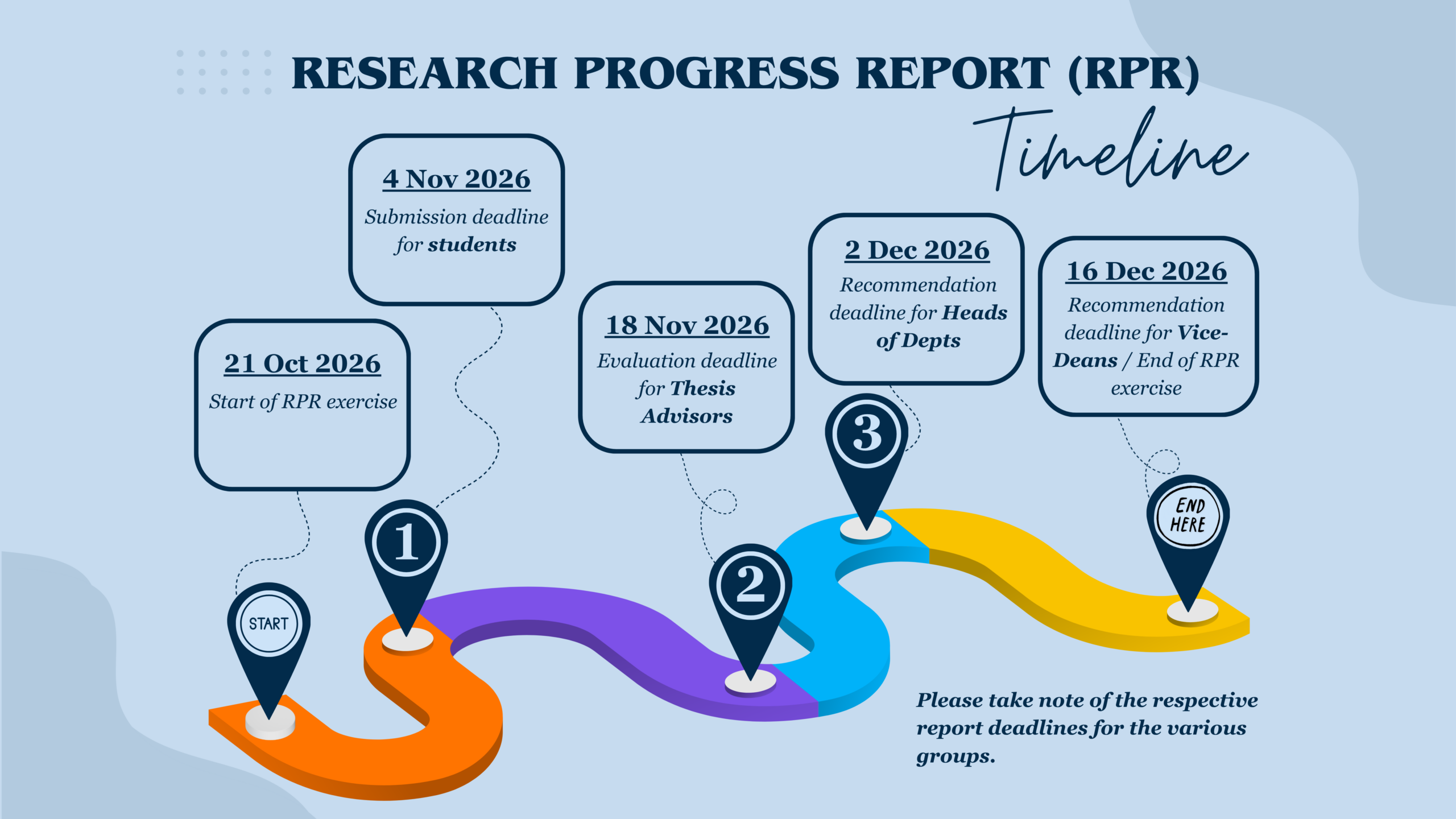
Students will receive a notification email (in late October or early April) at the start of the exercise and are required to complete their submission within two weeks.

This timeline ensures sufficient time for thesis advisors, Heads of Department, and Vice Deans to complete their respective evaluations and recommendations regarding continuation of candidature and/or scholarship.
WHAT to submit?

The RPR submission should include:

  • a summary of the work done in the reporting semester (e.g. modules taken, doctoral seminars attended, development and/or review of work plan, PhD Qualifying Examination, etc.),

  • a self-assessment, and

  • any additional comments (e.g. achievements, challenges, or issues encountered).
WHERE to submit?

The RPR must be submitted online via the NUS Education Records System (EduRec):

myEduRec Navigator > Academics > Graduate Research > Submit Research Progress Report


[NOTE: Research Scholars under the Graduate Assistantship Programme (GAP) are required to report completed GAP hours via the myGAP system. Submission of GAP records through the RPR system, including the GAP Summary Sheet, is no longer accepted.]
Timeline
What is ORCID?

ORCID stands for Open Researcher and Contributor ID. It is a unique digital identifier (a 16-digit number) that distinguishes you from other researchers and links all your academic work to you.

All graduate research students are required to have an ORCID iD* in order to proceed with the RPR submission.

Do you have an ORCID iD?

If you have not created one, you can do so at https://orcid.org/register. For step-by-step guidance, you may refer to this video.


Note: Your ORCID iD will only be reflected in ORCID’s database on the following day after creation. You may then proceed to enter your iD in the RPR system and complete your submission.

Submission Steps
Frequently Asked Questions

General Information
Yes. All research students are required to submit the RPR from their second semester onwards.

If you have not commenced research work, you may include details such as coursework completed, seminars attended, or preparatory work (e.g. literature review, research planning).
Yes. If an RPR has already been generated for you, you are required to complete and submit it. Please log in to myEduRec to confirm.
Yes. Submissions to your scholarship provider are separate and serve a different purpose.

The RPR is an institutional requirement for the University to monitor your research progress. It will be routed to your Main Thesis Advisor, Head of Department, and the Faculty/School Deanery.

Please proceed to submit your RPR via myEduRec.
Yes. Students who are on short-term Leave of Absence (LOA) during the RPR exercise period are not exempted from submission. You are required to complete and submit the RPR as soon as possible after your LOA ends.
Technical / System Access Issues
There may be several reasons why you did not receive the notification:

a) You are newly admitted in the current semester.
b) You are on term-long Leave of Absence (LOA) in the reporting semester.
c) You have submitted your thesis for examination before the the start of the RPR exercise.
d) You do not have a Main Thesis Advisor assigned.
e) Your NUSNET mailbox is full.

If (a), (b) or (c) applies, you are exempted from the current exercise, otherwise you are required to submit the RPR and should check with your Department Administrator on the missing notification.

If you do not have a Main Thesis Advisor, please approach your Department Administrator for assistance.

If your mailbox is full, please clear space to receive system notifications.

You may also verify if an RPR has been created for you by logging in to myEduRec and navigating to: My Homepage > Academics > Graduate Research > Submit Research Progress Rpt.
You may reset your password via your mobile device. Please refer to: https://nusit.nus.edu.sg/change-or-reset-your-nusnet-password/ for instructions.

If you require further assistance, you may contact NUS IT Care directly.
Your thesis advisor record may not have been updated in the system. Please contact your Department Administrator for assistance.
Please ensure that:

a) The file size does not exceed 1MB
b) The file is in PDF format
c) The file name is within 60 characters and does not contain special characters (e.g. \ / * < > ?)

If you continue to experience issues uploading the attachment, please contact your Department Administrator.
Submission Process
Yes, you are required to upload your RPR as a PDF file not exceeding 1MB.

The “Student’s Self-Assessment and Comments” section is optional. You may use it to highlight key achievements, important updates, or any challenges encountered in your research.
This applies only to PhD candidates.

Candidates who have passed the PhD Qualifying Examination (PQE) are generally expected to meet their TAC each semester. Please indicate the most recent meeting date prior to your submission.

If no meeting has taken place, you may leave this field blank.
From AY2024/2025 Semester 2 onwards, a survey has been incorporated into the RPR submission process.

The survey aims to assess your graduate experience and identify areas where additional support may be needed. Your responses will help enhance the University’s support systems.

All responses will remain confidential and used solely for service improvement. Please note that all responses submitted are final and cannot be amended.
No. The survey is a mandatory component of the RPR submission. You must complete it in order to proceed.
Submission Status / Deadlines
Amendments should only be made where necessary. Please note that the student survey responses cannot be amended.

  • If the status is “Pending Thesis Advisor”, please request your Main Thesis Advisor to reject the report via EduRec, which will return it to you for revision.

  • If the status is “Pending HOD/VD”, please contact your Department Administrator to have the report routed back to you.
Yes. You will receive an email notification once your RPR submission has been evaluated by the Head of Department and Vice Dean.

You may also check the status anytime via myEduRec: My Homepage > Academics > Graduate Research > Submit Research Progress Rpt.
Yes. You may access both current and past RPR records via myEduRec: My Homepage > Academics > Graduate Research > Submit Research Progress Rpt.
If your RPR is not submitted by the deadline, your submission status in EduRec will be recorded as "Deemed Unsatisfactory". Your case will be reviewed by your Department/Faculty, and disciplinary action may be taken where appropriate.

For Research Scholars, please note that the continuation of your scholarship is contingent upon the timely submission of the semestral RPR. Failure to submit will result in the suspension of your scholarship.
Support / Contact
Your Department Administrator should be your first point of contact for any queries or assistance. Your query will be escalated to the Faculty Administrators and/or the NUS Graduate School (NUSGS), if necessary.